Release notes *2.8.7*
docker run -it \
  -v ~/wljs:"/home/wljs/WLJS Notebooks" \
  -v ~/wljs/Licensing:/home/wljs/.WolframEngine/Licensing \
  -e PUID=$(id -u) \
  -e PGID=$(id -g) \
  -p 8000:3000 \
  --name wljs \
  ghcr.io/wljsteam/wljs-notebook:main
brew install --cask wljs-notebookBetter laser pointer
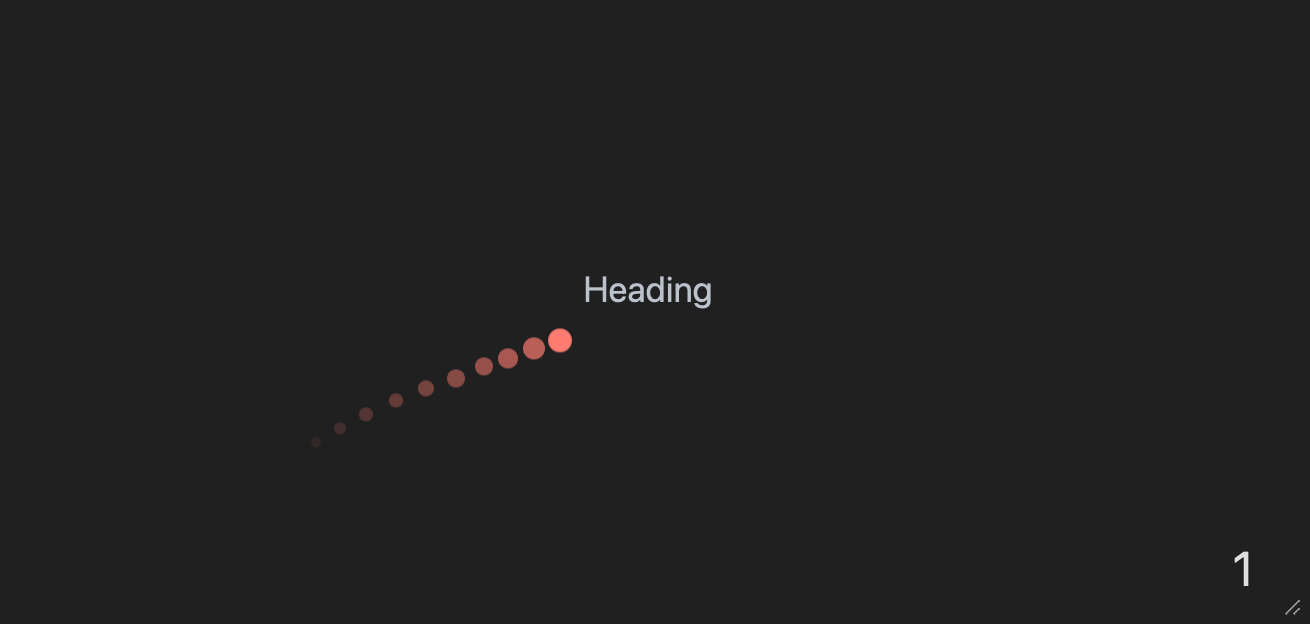
We improved our "laser" pointer used on slides. It has a trail and can work properly in fullscreen mode as well:
Press
Print feature!
This feature requires WLJS Notebook App, since we rely on our custom renderer implemented in Electron.js.
Now you can print any notebook directly to PDF document:
- Use command palette

- Or main menu
Manual page breaks
Since now you can easily print any notebook, it make sence to control page breaks manually.
It will also work if you export a notebook to HTML and then print it
Use PageBreakAbove or PageBreakBelow symbols in the context of Markdown or WLX cells:
.md
<PageBreakAbove/>
SignPath Certificate 📜
Now we are officially on SignPath as OSS organization! This allows us to digitally sign our DLL, installers for Windows machines. It should prevent any troubles with anti-malware software.
In a nutshell at
- SignPath Certificate for Windows (
%3Cspan%20style%3D%22color%3Agreen%22%3EFREE%3C%2Fspan%3E ) - Apple Developer License for MacOS (
%3Cspan%20style%3D%22color%3Ared%22%3E90%20EUR%2Fyear%3C%2Fspan%3E )%3Cscript%20type%3D%22module%22%3E%0A%20%20const%20el%20%3D%20document.getElementById%28%22spa-date-now%22%29%3B%0A%20%20setInterval%28%28%29%3D%3E%7B%0A%20%20%20%20if%20%28%21el%29%20return%3B%0A%20%20%20%20el.innerText%20%3D%20%28new%20Date%28%29%29.toLocaleString%28%29%3B%0A%20%20%7D%2C%201000%29%3B%3C%2Fscript%3E
Extensions for Wolfram Paclets
We’ve taken a big step toward extending standard Wolfram packages (Paclets) with our frontend extensions.
This means you can write a normal-looking Wolfram package for both Mathematica and WLJS that can take advantage of WLJS’s extra features when needed.
❓ What you can do with this:
- Ship JavaScript and CSS assets that are automatically integrated into the runtime once the package is loaded.
- Write a single package for WLJS, Mathematica, and WolframScript.
- Expose folders from your paclet to an HTTP server.
❓ Will it work for exported notebooks?
- Yes. JavaScript bundles will be compressed and embedded into the notebook if you apply it from the settings.
- You can safely publish your notebook.
- Anyone who doesn’t have those package assets installed will still be able to read the notebook without issues.
- Everything is cached and updated whenever changes are made to the paclet.
Example
Here’s how this might look in your PacletInfo.
PacletObject[
  <|
    "Name" -> "CoffeeLiqueur/SplatMesh",
    "License" -> "MIT",
    "Extensions" -> {
      {
        "Javascript",
        "Root" -> {"Assets", "Spark", "kernel.js"}
      },
      {
        "Javascript Bundle", (* only for exporting to HTML *)
        "Root" -> {"Assets", "Bundle", "bundle.js"}
      }
      <...>
Here is a good example we made:
Check out our first crossplatform library SplatMesh
%3Cbr%20%2F%3E %3Cbr%20%2F%3E %3Cdiv%20class%3D%22flex%20flex-row%20gap-x-2%22%3E%3Cimg%20width%3D%22450%22%20src%3D%22attachments%2FScreenshot%25202025-10-09%2520at%252023.15.51-7f2.png%22%2F%3E%3Cimg%20width%3D%22200%22%20height%3D%22300%22%20src%3D%22attachments%2Fscreenshot1122-074.png%22%2F%3E%3C%2Fdiv%3E
Improved 2D Graphics
We fixed an issue with automatic aspect ratio as well as some minor problems with arrows and curves:
transitionMatrix = {{7/10, 0, 3/10, 0}, {1/2, 0, 1/2, 0}, {0, 2/5, 0, 3/5}, {0, 1/5, 0, 4/5}};
mp = DiscreteMarkovProcess[1, transitionMatrix];
Graph[mp]
%28%2AVB%5B%2A%29%28CoffeeLiqueur%60Extensions%60Boxes%60Workarounds%60temporal%24282502%29%28%2A%2C%2A%29%28%2A%221%3AeJxTTMoPSmNkYGAoZgESHvk5KRCeEJBwK8rPK3HNS3GtSE0uLUlMykkNVgEKp6UmG6UYmRvrGpimpuiamCaa6SZaJiXpJlmkGKSYG6clGxuZAACRiRYt%22%2A%29%28%2A%5DVB%2A%29 Improved AnimatedImage
Now any of animated image can be safely exported to HTML, MDX (Static or Interactive)
AnimatedImage[
  Table[RandomImage[], {10}]
, FrameRate->30]
(*VB[*)(FrontEndRef["4978d4a1-c791-4262-bd49-623d9f9bf46c"])(*,*)(*"1:eJxTTMoPSmNkYGAoZgESHvk5KRCeEJBwK8rPK3HNS3GtSE0uLUlMykkNVgEKm1iaW6SYJBrqJptbGuqaGJkZ6SalmFjqmhkZp1imWSalmZglAwB4pRVa"*)(*]VB*) Operations with clipboard
We improved the compatibillity with Mathematica!
ClickToCopy["Click me", Red] Paste the clipboard content as a new cell
Paste[] Copy input form of the expression or text to the clipboard
CopyToClipboard["\"Sky is blue\""]; Paste button
PasteButton[Red, Blue] Export Animations as GIFs 🍳
Animate-like expressions are now easy to rasterize into the sequence of frames with AnimatedImage
This feature requires WLJS Notebook App, since we rely on our custom renderer implemented in Electron.js.
Then AnimatedImage expression can be safely exported to video, GIF or preprocessed using standard tools for images
Export["anim.gif",
 AnimatedImage @ Animate[
  ParametricPlot[ReIm[(*SpB[*)Power[I(*|*),(*|*)-t](*]SpB*) + 3 (*SpB[*)Power[I(*|*),(*|*)t/3](*]SpB*)], {t,0,u},
    Epilog->{
      Arrow[{{0,0}, ReIm[(*SpB[*)Power[I(*|*),(*|*)-u](*]SpB*)]}],
      Arrow[{ ReIm[(*SpB[*)Power[I(*|*),(*|*)-u](*]SpB*)], ReIm[(*SpB[*)Power[I(*|*),(*|*)-u](*]SpB*) + 3 (*SpB[*)Power[I(*|*),(*|*)u/3](*]SpB*)]}]
    }, PlotRange->{{-4,4}, {-4,4}}, GridLines->Automatic,
    PlotStyle->(*VB[*)(RGBColor[1, 0, 0])(*,*)(*"1:eJxTTMoPSmNiYGAo5gUSYZmp5S6pyflFiSX5RcEsQBHn4PCQNGaQPAeQCHJ3cs7PyS8qYgCDD/ZQBgMDnAEA4iUPRg=="*)(*]VB*)
  ]
 , {u, 0.001, 4Pi},
   RefreshRate->30,
   Appearance->None
  ]
]
"anim.gif" Import it back as AnimatedImage
ImageResize["anim.gif" // AnimatedImage, 250] %28%2AVB%5B%2A%29%28CoffeeLiqueur%60Extensions%60Video%60Internal%60imgSymbol%24410032%29%28%2A%2C%2A%29%28%2A%221%3AeJxTTMoPSmNkYGAoZgESHvk5KRCeEJBwK8rPK3HNS3GtSE0uLUlMykkNVgEKmxibpaSkGljoJiYbmOuamBkY6FqaGifrGpkaWZobmyaZpFqaAAB7DRTn%22%2A%29%28%2A%5DVB%2A%29 More async expressions!
To improve your async programming experience, we provide a few more standard expressions with async support.
Here is the async version of Rasterize:
cell = EvaluationCell[];
Then[RasterizeAsync[Style["Hey!", 14, Bold]], CellPrint[#, "After"->cell]&];
Async Export expression uses parallel kernels to export your data:
cell = EvaluationCell[];
Then[ExportAsync["data.txt", "Hello World!"], CellPrint[#, "After"->cell]&];
data.txt Hello World! AnimatedImage does also have a special option for async operations:
AnimatedImage[Animate[x, {x,0,1}], Asynchronous->True] Minor styles fixes
Fractions now looks more like ... fractions
(*FB[*)((1)(*,*)/(*,*)(123))(*]FB*) Better support for Text in 3D
We’ve added subscript and superscript support for Text in Graphics3D
Graphics3D[{Sphere[], Text[Style["x^{y}", FontSize->20], {0,0,0}]}, AxesLabel->{
  None, None, "x_{y}"
}, Axes->True]
(*VB[*)(Graphics3D[{Sphere[{0, 0, 0}], Text[Style["x^{y}", FontSize -> 20], {0, 0, 0}]}, AxesLabel -> {None, None, "x_{y}"}, Axes -> True])(*,*)(*"1:eJxTTMoPSmNkYGAoZgESHvk5KWnMIB4XkHAvSizIyEwuNnZJY4Kp8MksLoGoZwMSwQUZqUWpEB0w2UwgzYAgEFpDUitKIDxWkNaSypzUYBCrIq66shahLKg0J7WYA8hwy88rCc6sSs0UARlDnB1gzZxAhmNFarFPYlJqDqpGMMMvPy8VzoA4IR7TCSxQUyBuLypNBQARRTpB"*)(*]VB*) More options for lighting sources
Mathematica's implementation of PointLight and SpotLight lacks simple parameters such as brightness. We extended these symbols with extra options:
Table[
  Graphics3D[{Sphere[], PointLight[Red, {-1,-1,1}, "Intensity"->i]}, ImageSize->150]
, {i, {1,10,100}}] // Row
(*GB[*){{(*VB[*)(Graphics3D[{Sphere[{0, 0, 0}], PointLight[RGBColor[1, 0, 0], {-1, -1, 1}, "Intensity" -> 1]}, ImageSize -> 150])(*,*)(*"1:eJxTTMoPSmNkYGAoZgESHvk5KWlMIB4XkHAvSizIyEwuNnaBiIFU+GQWl0DUswGJ4IKM1KLUNGZk2UwgzYAgIJIg4wLyM/NKfDLTM0ogYhxAIsjdyTk/J78okxGLJriJ/4EAQoCUIRwTVJqTGswJZHjmlaTmFWeWVGJRUAxWkJuYnhqcWZWaOQ3IAwD/MTW2"*)(*]VB*)(*|*),(*|*)(*VB[*)(Graphics3D[{Sphere[{0, 0, 0}], PointLight[RGBColor[1, 0, 0], {-1, -1, 1}, "Intensity" -> 10]}, ImageSize -> 150])(*,*)(*"1:eJxTTMoPSmNkYGAoZgESHvk5KWlMIB4XkHAvSizIyEwuNnaBiIFU+GQWl0DUswGJ4IKM1KLUNGZk2UwgzYAgIJIg4wLyM/NKfDLTM0ogYhxAIsjdyTk/J78okxGLJriJ/4EAQoCUIRwTVJqTGswJZHjmlaTmFWeWVGZyYSgoBivITUxPDc6sSs2cBuQBAACNNb8="*)(*]VB*)(*|*),(*|*)(*VB[*)(Graphics3D[{Sphere[{0, 0, 0}], PointLight[RGBColor[1, 0, 0], {-1, -1, 1}, "Intensity" -> 100]}, ImageSize -> 150])(*,*)(*"1:eJxTTMoPSmNkYGAoZgESHvk5KWlMIB4XkHAvSizIyEwuNnaBiIFU+GQWl0DUswGJ4IKM1KLUNGZk2UwgzYAgIJIg4wLyM/NKfDLTM0ogYhxAIsjdyTk/J78okxGLJriJ/4EAQoCUIRwTVJqTGswJZHjmlaTmFWeWVGamYCgoBivITUxPDc6sSs2cBuQBAA2PNhk="*)(*]VB*)}}(*]GB*) Check out our documentation page for more!