
What is WLJS
The notebook interface
The notebook interface (or IDE) combines live code in Wolfram, JavaScript, and other languages. We provide GUI building blocks for user input/output, a subset of LaTeX for equations, Markdown for narrative text, and data-driven presentations.
Think of it as a multi-tool platform for research, experiments, or as a powerful sandbox where you can try out your ideas, write a story about them, and then publish them on the web. Like this one:
Read our fast-track introduction on Wolfram Language at that page
.md
Let's write a function to generate notes in the given scale:
Let's write a function to generate notes in the given scale:
scale["Major"] = {2, 2, 1, 2, 2, 2, 1};

makeScale[root_, sc_, pos_] := With[
{b = Accumulate @ Prepend[sc, root], n = Length[sc] + 1},
b[[Mod[pos - 1, n - 1] + 1]] + 12 Quotient[pos, n]
];
.md
Now we can generate any chord progressions in a major scale, for ex. **I-V-VI-IV** Now we can generate any chord progressions in a major scale, for ex. I-V-VI-IV
chords = makeScale[1, scale["Major"], {#,2+#,4+#}] &/@ {
  1, 1, 5, 5, 6, 6, 4, 4, 1
};
SoundNote /@ chords // Sound
(*VB[*)(Null)(*,*)(*"1:eJxTTMoPSmNkYGAoZgUSwfmleSlpnCAuC5DwySwugUhywiT98ktS05iRFWSCFGSCdGdyAAnqqwepyuQBEfw0Uc8FUsoLIgRpop4NpBSuifrqUcMTAOwDUao="*)(*]VB*) .md
Visualize it on imaginary piano Visualize it on imaginary piano
blackQ[y_] := MemberQ[{2,4,7,9,11}, Mod[y-1,12]+1];
ListStepPlot[(*BB[*)(Transpose[chords])(*,*)(*"1:eJxTTMoPSmNmYGAo5gcSAUX5ZZkpqSn+BSWZ+XnFaYwgCRYg4ZGfkwLh8QCJkKLEvOKC/OJUp/yKYJBoSBoTTGVQaU5qMFhLamJKMCeyajRFrECGa1lqXglYyK80JwcAFSsgcg=="*)(*]BB*), PlotStyle->(*VB[*)(Hue[0.03561231666487014, 0.8918383801498982, 0.8795337025157177, 1.])(*,*)(*"1:eJxTTMoPSmNiYGAo5gUSYZmp5S6pyflFiSX5RcEsQBHn4PCQNBCjmANIBLk7Oefn5BcVicky3lVWfWNfpLliouDmCxfsi/5vOjStL2qHfREDGHywBwA7SBsq"*)(*]VB*), Prolog->Flatten@Table[{If[blackQ[y],(*VB[*)(RGBColor[0.5666666666666667, 0.5666666666666667, 0.5666666666666667])(*,*)(*"1:eJxTTMoPSmNiYGAo5gUSYZmp5S6pyflFiSX5RcEsQBHn4PCQNGaQPAeQCHJ3cs7PyS8qUgKDR/aYDAAR9RPe"*)(*]VB*),(*VB[*)(GrayLevel[0.95])(*,*)(*"1:eJxTTMoPSmNiYGAo5gUSYZmp5S6pyflFiSX5RcEsQBHn4PCQNGaQPAeQCHJ3cs7PyS8qSgODd/aYDABY1RjK"*)(*]VB*)], Rectangle[{.5,y-.5},{9.5,y+.5}], (*VB[*)(GrayLevel[0])(*,*)(*"1:eJxTTMoPSmNiYGAo5gUSYZmp5S6pyflFiSX5RcEsQBHn4PCQNGaQPAeQCHJ3cs7PyS8qYoACTAYAyrgOFw=="*)(*]VB*), Line[{{.5,y-.5},{9.5,y-.5}}]}, {y, 0, 18}]]
(*VB[*)(Null)(*,*)(*"1:eJztWmtsFEUcvxYEhEJLaWoFKX0RXgEsJCTExx60UJq0cPQK0cQPLHdz14G93WN2D3uYGCXhA8Zv8kVDNKKJQQ0xBgyaGBI+SBQFJOCDRwQFgYBSA1FM8DEzuzN3u7e30zt2TQA36e7M/mf+z9/+5z9zbV6v9SUqQ6GQPgbfupCcHoAx3XwzEt96oG4kRth6oULaWHxboqqaIRtQUxMVthEPeMy29ypdeI0olEZuKzIAbXpi7LdvpS9KaCG9fso1EmSC/iC+dUIEYgbcDEylyKuIBlUjCreAnN19VJasQDIIPo5v5vCJRJf1uqZkDNCPHbNRBboOyTS7Jrubj0849NguCS3+48W3h7Zfk1D91IqzrdOvSSaf0fi2Ki3HoJFFIXoNSfleUgEgTGvxX2WIXUMSe+78h16S/X0ozPpHKHl02E4fY/Wbwia9mvfNZw3vX6L0SQ56nfVss+gP8b75bHDQpzjoj/BxJn2aY14T79+k9GYHvcVhTxvvR+vxo2NARgZUk+siCG6WDbCuX062tpeKoZqaDcu2/n3tXsdQXdiOIRZbhqG6sB1DjM4wNNOBoZnWs4b37RhidMZntgNDs61ng4M+xUFnGGpzYIhhoYn37Rhi9BaHHm28XxxDC0rF0AcvzTi6tf3gvY6hJgeGmO8ZhpocGGJ0hqF5DgzNs541vG/HEKOz2LU7MNRuPRsc9CkOOsPQbAeGGMaaeN+OIUZvcYzLYa84hhaacRmHb0t0XYtBE0R8We3LKCBKoroCJgcU/GcsU0AKqIa19HpPJCtqj7weKPaVNkrC+9TTJsU+gzSWyopzwnjc6FbjMIb1jlO6fdp4KiirZYxVaaKHnqgSa1eNGxFZBUpE0QxztrnOe0+jnwSe0SerSeAoQGw9SJghFovitPawi9uWIznlyV2no2RFB7lWKSOoJJo7BoG+CsEkVF1UpDcXB3Sn5CTI5QQ+Z6CCDSci+2EK6I53Ee1ZgKiLuzQlDlSaSiDBswsUiG4Oo0ijH2UAb7iYRJEVNbIKcCvc+FAzzmmc76gSZehIUNYJEnJGMUxx9ux7N2TV/3X0R0c7MCaH8lImhSPOvMszaszMTsPInTRlaxqKQxUnPb1f0xSW2yqYoYyhI09UcIttg/ibbgxpAyufS7JRnM+ot3KcIni1cBkAOfPAJFSGClJODRkQk12cWCQ55ith16jkcTyr4HUzBQn4dM+sMoqkjY7lipwsmnZJoxcYsglsbxwQ060UwwFlN4Iup51ZVU7hHTF5uVJTnRKJJngBBYOequcHU69i7A2QJuudY+wEYibSMmmuVc5cU2lToyJKe+6v7b1GgcYdmmogTdGLuVuvpplDTytylltXPNY6UZ4v8BE5jr/ApBfYTAyPsiAK4ui5uj1d57fskIoTypz/2qvk2i3l8gdRuBNgw0Ccpjeid7dqACSTNElATWrktoLXLiZbIFsq4/jRtcwOsiqLOzt6ibqfw5Tg8Ltd/3vG3Duug/TyajW6fpNpjp0An0sSWZGMppdSujpdX2J8/7N6nBpFJbl4ZPj+Gbb/qKh+XAh5L6Y0TBlDS+Hwx+y9ckby0HchGCd7eTfYeKk+IX+uCX5eDuYqxEr2CqM+2wM2A8Uq1s5JViL93lG10VSL1+UBLZ6odvdHbt8wCHW2NojTPJ1Wl/fVahk1LqMsVd7LT7SQtCaxr5dnhoLTHvtUUhasxd8vHmcd9NxwqlRLv0s5trFXy+ggoumwsJzMfcXFyhkiaFkigf2ueypE7MyVAxUeI4kkRJONSzE4IZ8NLf/L50Uhg7S0UghDF1clEAAJDaU6MkjXUK8WL7oLJXxxeonRsxJPvkT1wShx25KCYw1Cy0aLlHR5i0Av0AfyvoP8fQ7fHsFRhdbnsSBrhcnCBfn2D4uGmO6zupZ2aIqG0P7GbVdX7z+Sd7BofmBXJOHGa1j8E/T6VULv/na8d33NBQnRX1SeOOgT/2lE/cazkiXoZwmd30K+4S984n9i3+9Prtn2i4TOzH/j/YY930loZlfFrnWf+cX/4rGW038+/6OE+mgkzrFAXPWJf9++syN/2HtZQjtXTX1vx+unJTT08PZjYxZ94hN/lo6tzInjG6LXkE/8GTercZk1hnEwUIL+V3LrihWIyz7pf3s3wT12y1dfkuuC3/qvoHDH+DQbJxl+Dvuk/+zF0ztr38FuCZ+8ubprr+/41Ma9OX5D83UJDXTcvrT1As4/p04erTp16EOf+L8c2rTk41cuSeijG3+dGLzyjYR6Fq185nDDOZ/474osbD11/WuWdnD+SZ75/NOZg6eHyZ8ndHIO3onrCKiWWJuQ7YJtv+u99eTzJoXIUZgBU3iFIUtIr4w24pKj2LJIhnerMSUTB3wFx9I8KyDbci8umPzRiB744GUe4eU7CtzOPoJTyePkz6uQcNnU3IcnhZOo89IQxNfKSgbcf54Y1jHDcH71IykhmtUNkOoh55463D+uwNvkK1mjA2SNqJlRMGKiNcJ+yuFxHhDoT2vcG1RChwLTaZJ+iqhztxwE2vavEYSXlGSip5CxfS/MaurcCtWH1ydsqfMoKbdrthoHXOmtYT7QRZx5GGP7Bd/LkyXLPOCviZK3uFtBmCiQiemFhUMLvXDhX9Ao2eZbAvkjw/7bLJLp6ufywzoy7C2uKgATRTIxPdCwVgnk1wZgs0imq5/LD2utQFx9ACaKZLq6tXwT6wXiJgdgokhmfcDInSyQ3xiAzSKZrn4uP6yNAnHNAZgoktkYcFibBfJbA7BZJNPVz+WHtVUgbnoAJopktgYc1ukC+TMCsFkk09XP5Yd1hkDcrABMFMl0dWv5Js4SiJsTgIkimbMCRu4cgfy5Adgskunq5/LDOlcgbn4AJopkzg04rPO95b/waAA2C2S6+7nssBITPE1s999EoUxXt5ZvYrtA3IIATBTJLDhUMv/VueC/KMT/DXEn/xL0Lx60es4="*)(*]VB*) WLJS is more than just a REPL or Jupyter clone ducktaped on Wolfram Engine; it provides its own standard libraries, runtime, UI kit and implements all manipulate features, graphics, sound from scratch allowing it to run expressions even without a kernel, just in the browser:
Manipulate[ParametricPlot[{Sin[u] u , Cos[u] u},
{u, 0, t}, PlotPoints -> 125, Axes -> False, MaxRecursion -> 0,
PlotStyle -> Thick], {t,10,100,10}, ContinuousAction->True]
(*VB[*)(FrontEndRef["243bf338-3fd1-494e-897f-7baf372bfca3"])(*,*)(*"1:eJxTTMoPSmNkYGAoZgESHvk5KRCeEJBwK8rPK3HNS3GtSE0uLUlMykkNVgEKG5kYJ6UZG1voGqelGOqaWJqk6lpYmqfpmiclphmbGyWlJScaAwCAaBXf"*)(*]VB*) Is it like Mathematica?
WLJS Notebook is free and open-source software , that connects to and uses freeware Wolfram Engine. We provide compatibility layer for Wolfram Mathematica features as well as extend the language with event system, async functions, integration with web-technologies and many more. Notably:
- Output cells are editable and mostly are valid for evaluation
- Wide support for syntax sugar, math typesetting
Graphics,Graphics3D,Sound,Image3Dwork and also are interactive- Most plotting functions work out of the box
Manipulate,Animateare supported, but with some limitations- Output expressions are also valid for console input, unlike Mathematica's output form
If something is not working, but you really need it
Apply MMAView expression on anything to make it looks like in Mathematica. It will bypass all WLJS pipleines and be rendered to an image.
Can it open
.nbfiles? Yes! There are some limitations regarding complex styling / formatting of the text, and dynamic modules (see below). But we gradually improve the compatibility with every update.
Why not Jupyter Lab or VSCode?
We chose to build our own system because:
- A Jupyter kernel for Wolfram Engine already exists
- We wanted powerful syntax sugar, editable output cells, multimedia cells — which require a custom extendable code editor
- Frontend - Kernel interface based on ZMQ is quite robust, but it doesn't meet our needs for a low-latency communication with text and binary large payloads
- Adding a 3rd main language or API would increase long-term maintenance
Under the hood
A combination of native and web-technologies allows WLJS Notebook to run remotely on a server or on a desktop computer.
We heavily rely on Javascript and HTML for 3 reasons:
- It is safe sandbox for experiments and research
- Easy access to GPU resources and fantastic libraries for data-visualization
- The interactive content of the notebook can be exported and published on web
User Interface
Your notebook is a file and is an entry point for taking notes on your data, research, and processing, or even creating interactive reports in the form of presentations. You may store files inside a notebook via NotebookStore, but we recommend keeping large files in a separate folder:
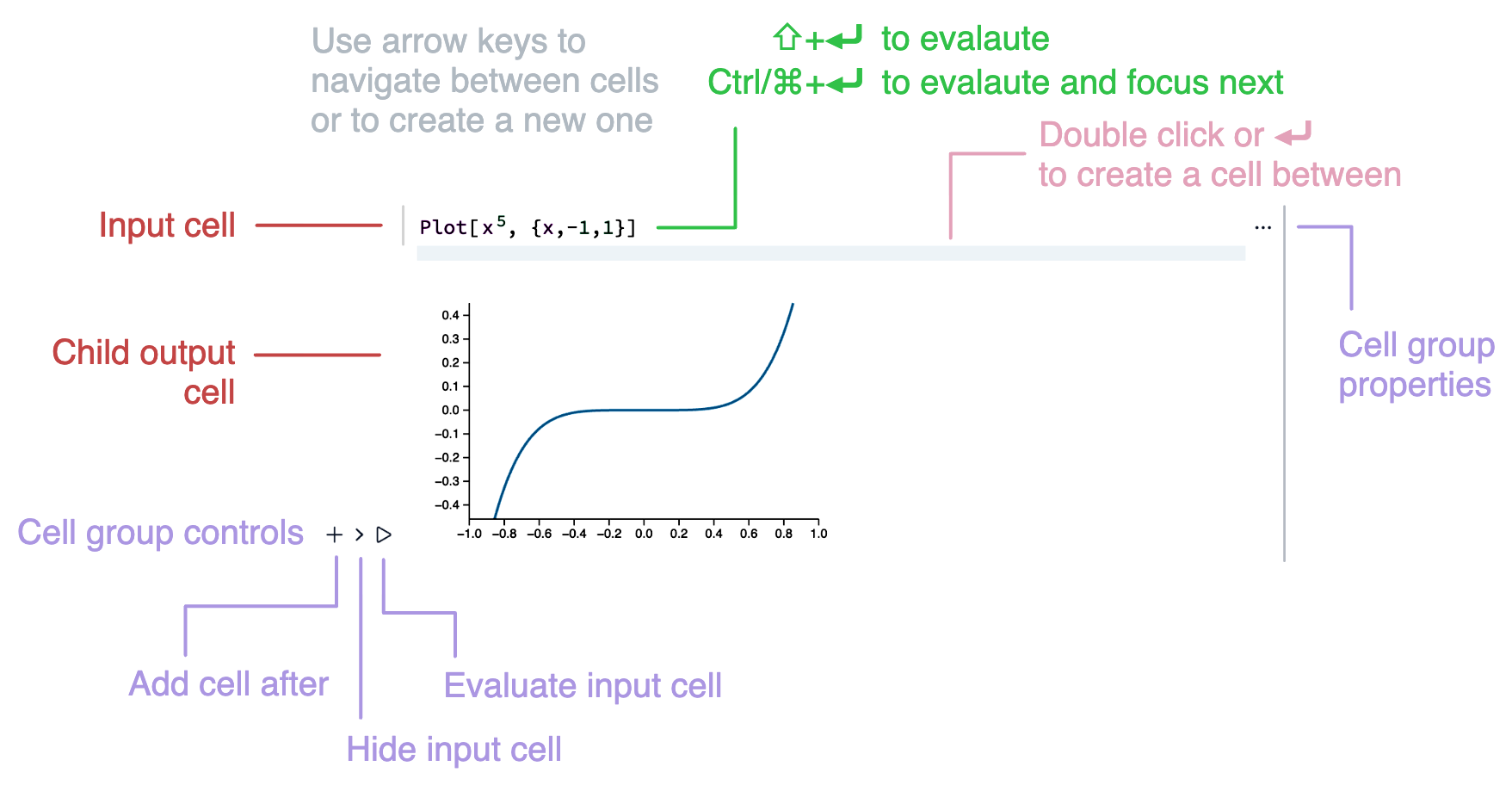
The notebook consits of cells or groups of input-output cells. Input cell gives you a superpower to switch between languages or type of produced content with a single line:
1+1 .md
Here is a text note .js
return 1+1; .slide
# Slide
My presentation
data.txt
Write directly to a file
Think of it like an anonymous file. We intentionally avoid menus, lists to give the most space for the content you write
If nothing matches the pattern in the first line, it will assume Wolfram Language input.
After typing, press Shift-Enter or Ctrl/⌘-Enter to make the magic happen.
The output cells are results of evaluation. They can be many things: markdown rendered content, a slide of a presentation, a DOM element returned by Javascript cell or a Mermaid diagram:
{1,2,3} /. i_Integer :> Hue[i/3] {(*VB[*)(Hue[1/3])(*,*)(*"1:eJxTTMoPSmNiYGAo5gUSYZmp5S6pyflFiSX5RcEsQBHn4PCQNGaQPAeQCHJ3cs7PyS8qYoACKOODPVwEANd+D0Y="*)(*]VB*),(*VB[*)(Hue[2/3])(*,*)(*"1:eJxTTMoPSmNiYGAo5gUSYZmp5S6pyflFiSX5RcEsQBHn4PCQNGaQPAeQCHJ3cs7PyS8qYoACdMYHewDM1w9G"*)(*]VB*),(*VB[*)(Hue[1])(*,*)(*"1:eJxTTMoPSmNiYGAo5gUSYZmp5S6pyflFiSX5RcEsQBHn4PCQNGaQPAeQCHJ3cs7PyS8qYgCDD/ZQBgMDnAEA4iUPRg=="*)(*]VB*)} .mermaid
gantt
  section Waffle
      Iron  : 1982, 3y
      House : 1986, 3y
gantt
section Waffle
Iron : 1982, 3y
House : 1986, 3y
You can mutate Wolfram output cells to new input cells by editing them.
Cell group properties
Even plain text cells are evaluated and produce output. For this reason you can change the properties of the group and, for example, hide input cell for clarity:
- Clear output - removed all output cells
- Project to a window - evaluates input cell in a new window; it can be used for projecting slides, or control sliders
- Make initialization cell - marks input to be evaluated at the startup
- Copy group - copies a group as a special compressed string; paste it to an empty input cell
- Split to new notebook - cuts all cells below and inserts to a new notebook
- Insert cell before
- Hide / Show - hide or show input cell of the group; it can be used for markdown text cell
- Shrink / Expand - hides large content of the input cell
- Lock / Unlock - enables / disables editing of the input cell and hides the content
- Vanish - permanently hides input cell
- Delete - deletes the whole group
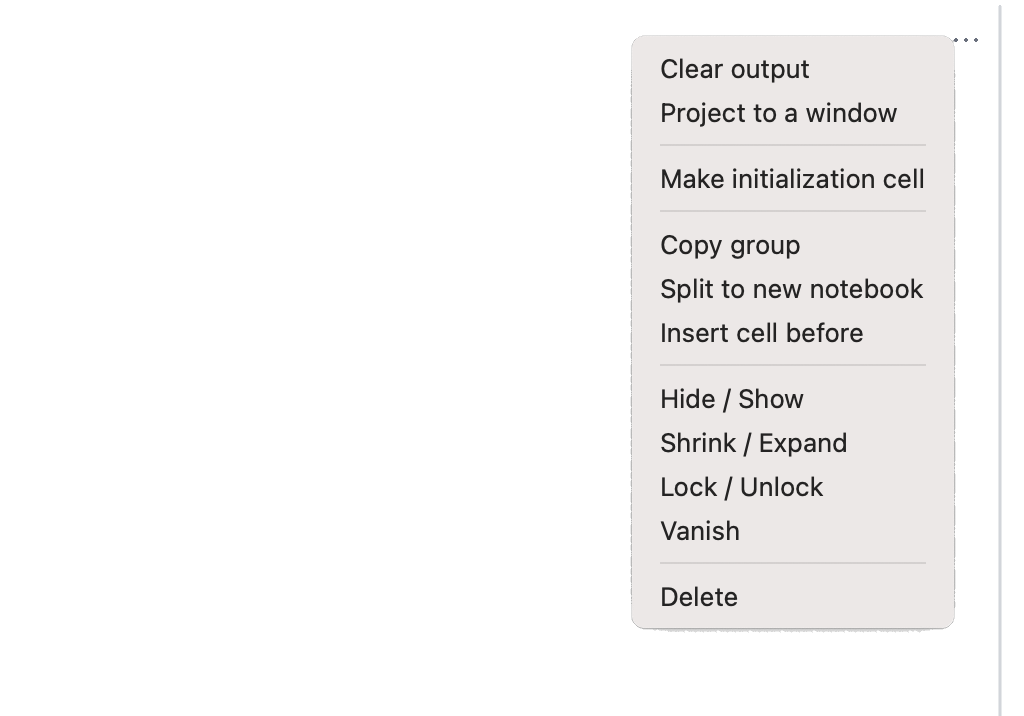
Project to a window > is a particularly useful feature that lets you evaluate a cell in a new window. This is especially helpful when presenting slides or distributing multiple controls / graphics outputs across windows.
Context menu
Extended context menu provides you the following features on selected text
- Evaluate in place - evaluates selected expression and replaces it with the result
- Iconize - compresses selected expression to encoded string or to a file (depending on size) and replaces it with an icon
- Store in notebook - copies an expression to a notebook storage (see NotebookStore symbol)
- Simplify - applies Simplify on selected
- Speak - speaks any selected text using a voice synthesizer
- Highlight - highlights WL expression with yellow
- Hidden comment - turns selection into a comment in WL
- Copy
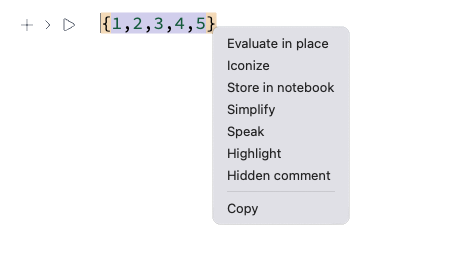
Options except Speak and Copy are only valid in Wolfram Language cells.
Math typesetting and shortcuts
To be honest, typing mathicamtical expressions in the most modern IDE for programming languages did not evolve since 1964. Our goal is to change that in a similar way as Mathematica did (over nearly 20 years), but in open-source.
So to style code expressions, replace them, or add additional elements in between we use decorations. The most common one for example:
(*FB[*)((1)(*,*)/(*,*)(2))(*]FB*) used to render fractions, if you copy it to a text editor you will still see a valid expression of (1/2)
(*FB[*)((1)(*,*)/(*,*)(2))(*]FB*)the meta information is stored safely in comments, the same works with graphical, sound or any other non-textual output. In this sense the standard output form of WLJS is decorated InputForm. Here is more complex example:
(*TB[*)Integrate[(*|*)f[x](*|*), (*|*)x(*|*)](*|*)(*1:eJxTTMoPSmNmYGAo5gUSYZmp5S6pyflFiSX5RcGcQBHPvJLUdCA3NZMRpIgVSLgl5hSnAgCQTg44*)(*]TB*) while under the hood we have:
(*TB[*)Integrate[(*|*)f[x](*|*), (*|*)x(*|*)](*|*)(*1:eJx...metainfo*)(*]TB*)Decorated expressions can be infinitely nested and fully navigable with keyboard input:
Use arrow keys ↔ to navigate your cursor inside boxed expressions or click to edit them directly.
To assist with writing basic mathematical expressions, we provide special keyboard shortcuts to insert templates or apply formatting to selected text:
Cells
- Ctrl-/: Create fraction
- Ctrl-6: Power
- Ctrl-2: Square root
- Ctrl--: Subscript
- Ctrl-=: Semantic input
- ESC: Open suggestions for greek symbol
- Alt-/ or ⌘-/: Comment a line
- Ctrl-F or ⌘-F: Search inside cell
Evaluation
- Shift-Enter: Evaluate cell
- Ctrl-Enter or ⌘-Enter: Evaluate cell and jump to the next
- Ctrl-Shift-Enter or ⌘-Shift-Enter: Project cell to a window
- Alt-I or ⌘-I: Evaluate initialization cells
Notebook
- Alt-2 or ⌘-2: Hide/show input cell
- Ctrl-U or ⌘-U: Clear output cell
- Ctrl-N or ⌘-N: New notebook
- Ctrl-S or ⌘-S: Save notebook
- Ctrl-O or ⌘-O: Open notebook
- Ctrl-P or ⌘-P: Open command palette
Command Palette
Use Ctrl-P or ⌘-P to access useful tools like matrix builders, color pickers, and more:
Palette items are also normal notebooks with special cells inside.
Overlay
There is also a global shortcut to call WLJS overlay for quick evaluations available on desktop Shift-Alt-Space.Interactivity
Interactive elements like Manipulate, Animate, ManipulatePlot, and AnimatePlot optimize performance by using low-level, fine-grained updates that avoid full re-evaluation of expressions. Here's an example of this approach:
var = 1.0;
Graphics[{
  (*VB[*)(RGBColor[0.9324328496246868, 0.4779810744981178, 0.2076180267119551, 1.])(*,*)(*"1:eJxTTMoPSmNiYGAo5gUSYZmp5S6pyflFiSX5RcEsQBHn4PCQNBCjmANIBLk7Oefn5BcVvQqJzqq99ta+iOnxkXe20+/ZF329mWJrNfmUfREDGHywBwB/2B0I"*)(*]VB*), Rectangle[{0,-.1}, {Offload[var], .1}],
  (*VB[*)(RGBColor[0.5767811690402207, 0.576646915402451, 0.5765764507985959, 1.])(*,*)(*"1:eJxTTMoPSmNiYGAo5gUSYZmp5S6pyflFiSX5RcEsQBHn4PCQNBCjmANIBLk7Oefn5BcVLbKzP/G35JF9keDReOsnxUDG++hfJQEgBgMYfLAHAHLqHLY="*)(*]VB*), Text[var//Offload, {Offload[var + 0.05], 0}]
}, AspectRatio->0.1]
The nearest parent symbols (Rectangle and Text) become dependent on the symbol var wrapped with Offload, though this doesn't apply to simple math operations. Changing var will trigger an update of only these dependent elements.
(*VB[*)(Graphics[{RGBColor[0.9324328496246868, 0.4779810744981178, 0.2076180267119551, 1.], Rectangle[{0, -0.1}, {Offload[var], 0.1}], Directive[RGBColor[0.5767811690402207, 0.576646915402451, 0.5765764507985959, 1.], FontWeight -> 800], Text[Offload[var], {Offload[var + 0.05], 0}, {1, 0}]}, AspectRatio -> 0.1, "Controls" -> False, PlotRange -> {{0, 1.2}, Automatic}])(*,*)(*"1:eJxTTMoPSmNkYGAoZgESHvk5KWkgRjEHkHAvSizIyEwuhoiACJ/M4hKEfJC7k3N+Tn5R0auQ6Kzaa2/ti5geH3lnO/2efdHXmym2VpNP2RcxgMEH+zQmkC5OkK7U5JLEvPScVIgQzNhMkLqiWTNBYOd+VDmIA9mBhH9aWk5+YkoxM5BdllgEU49kvEtmEdCCzLJULO5cZGd/4m/JI/siwaPx1k+KgYz30b9KAkAMVHeCtAaV5qQWcwEZbvl5JeGpmekZJZkKQHvTmGEqQlIrcDuNgA8Q0gE5pcVo/llpDw4NtAACGYEmDnYjN5DhWFwA9HVQYklmPlqYwJQFg0LCGeiVovyc4mJWkL8Sc4pT0cziBDsoH2hSXjpaBGGLLmMw+GwP1udYWpKfC3RBMgA53ZpC"*)(*]VB*) For user input, we use an event-based approach by assigning handler functions to interactive elements like sliders:
EventHandler[InputRange[0,1,0.1], Function[val, var=val]] Try dragging the slider to see the result:
(*VB[*)(EventObject[<|"Id" -> "71ade53b-7a60-40e5-84f3-279c2f7c5c16", "Initial" -> 0.5, "View" -> "81b5b125-693b-4830-868c-be07d724e831"|>])(*,*)(*"1:eJxTTMoPSmNkYGAoZgESHvk5KRCeEJBwK8rPK3HNS3GtSE0uLUlMykkNVgEKWxgmmSYZGpnqmlkaJ+maWBgb6FqYWSTrJqUamKeYG5mkWhgbAgB1kxTp"*)(*]VB*) Performance
How far can we push Offload? WLJS architecture is optimized for rapid mutations, binary payloads, and streaming updates. Here are some real-time benchmarks demonstrating interactive performance:
All examples were captured using a screenrecording app on the notebook cells.
Portability
WLJS Notebook offers multiple export formats that preserve interactivity, allowing you to share your work in the way that best suits your needs:
Self-contained HTML file
Everything is embedded in a single file: all cells, internal notebook storage, and images.
No internet dependency — works completely offline and remains functional even after future updates. You can always re-import the exported notebook back into WLJS.
Best for long-term storage, sharing notes, presentations, or reports with colleagues. No external programs or plugins needed—just a browser
Embeddable HTML
Cells are converted to web components with interactivity metadata provided as JSON assets. Works both offline and online via CDN (default):
wljsteam/web-components
0
Ideal for basic blog pages and publishing notes on the web
MDX
Similar to Embeddable HTML, but adapted for JSX environments, particularly the Next.js framework. A working template is published in the repository:
wljsteam/web-components-mdx
0
Ideal for modern blogs and content platforms that support Next.js or React
Markdown
Only input cells and output text cells are converted to Markdown; all other outputs are stripped.
Best for documentation or AI engines when interactivity isn't needed
Export the entire notebook to PDF or slides only from your presentation.
Perfect for static documents, printing or projecting slides (when other options are not available)
Mini application
WLJS Notebook can be used as a runtime for mini apps. It's a single-window application that uses the full capabilities of a normal notebook (similar to Wolfram CDF or LabView programs) and runs in an isolated, generated context.
Great for distributing standalone tools
Mathematica Notebook
Convert a .wln notebook to a .nb file with some limitations.
Useful for sharing work with Mathematica users
Technology stack
Both the server and desktop applications run on the same technology stack.
Backend
- Wolfram Engine - acts as TCP/HTTP/WebSocket server and handles logic
- libuv - acts as crossplatform sockets library
- WLX - template engine for server-side rendering (similar to JSX)
Frontend
- WLJS Interpreter - reduced 3kB Wolfram Language interpreter
- CodeMirror 6 - main code editor and the heart of the system
- D3.js, Plotly.js - vector graphics rendering
- THREE.js - 3D graphics rendering
- Custom WebGL shaders - for 3D images and complex 2D graphics
- Marked.js - markdown renderer
- KaTeX - equation rendering
- Reveal.js - markdown engine for presentations
- Tone.js - sound generation
- XTerm.js - terminal emulation
- Excalidraw - hand drawing input in markdown cells
Backend and frontend communicate via Wolfram expressions transported over binary or textual WebSockets.
The desktop application adds Electron Framework and Electron Builder to the mix, along with PDF.js and napi-rs/canvas for PDF generation and a bunch of native modules (electron-trackpad-utils, native-prompt) for better desktop integration.