Release notes *2.8.0*
Unix Sockets
We removed a landmine found in a dynamic library used for TCP/IP communications (USocketListener Library) on macOS and GNU/Linux. It sometimes caused a violation of the order in which TCP packets are sent, leading to unpredictable behavior in the communication between the GUI and the Wolfram Kernel.
What was affected:
- All Docker images before
v2.8.0. .deb,.ziparchives for GNU/Linux..dmg,.ziparchives for macOS.
Thank You
Thank you for supporting us and sharing your experiences. This helps us find time to direct our passion into WLJS.
We are grateful to those awesome individuals who recently supported us on Open Collective:
Extended methods for Image
We've made Image similar to Graphics expression and added the support of EventHandler listeners:
With[{
  buf = Unique["inmg"],
  get = ImageData[
    LinearGradientImage[{{0,0}, #}->{Blue,Green}, {300,300}],
    "Byte"
  ]&
},
  buf = get[{300,300}];

  EventHandler[Image[buf // Offload, "Byte"], {
    "mousemove" -> Function[xy,
      buf = get[{0,300} - {-1,1} xy];
    ]
  }]
]
(*VB[*)(FrontEndRef["dbab9e23-4c6d-41c8-b33d-0397eb1ee057"])(*,*)(*"1:eJxTTMoPSmNkYGAoZgESHvk5KRCeEJBwK8rPK3HNS3GtSE0uLUlMykkNVgEKpyQlJlmmGhnrmiSbpeiaGCZb6CYZG6foGhhbmqcmGaamGpiaAwCRsBX9"*)(*]VB*) Canvas2D
A build-in library for working with HTML5 Canvas. It provides 1:1 mapping of CanvasAPI (not full coverage by now):
Read more about it in Advanced section of the documentation
Needs%5B%22Canvas2D%60%22-%3E%22ctx%60%22%5D%3B context%20%3D%20ctx%60Canvas2D%5B%5D%3B%0AImage%5Bcontext%2C%20ImageResolution-%3E%7B300%2C300%7D%5D (*VB[*)(FrontEndRef["d29c9b9a-cd3b-4492-bc8b-f49b99c5b6f2"])(*,*)(*"1:eJxTTMoPSmNkYGAoZgESHvk5KRCeEJBwK8rPK3HNS3GtSE0uLUlMykkNVgEKpxhZJlsmWSbqJqcYJ+mamFga6SYlWyTpppkARS2TTZPM0owAkhoWRw=="*)(*]VB*) Send commands to the context:
%28%2A%20red%20rectangle%20%2A%29%0Actx%60SetFillStyle%5Bcontext%2C%20Red%5D%3B%0Actx%60FillRect%5Bcontext%2C%20%7B110%2C%20110%7D%2C%20%7B150%2C%20150%7D%5D%3B%0A%0A%28%2A%20semi-transparent%20blue%20rectangle%20%2A%29%0Actx%60SetFillStyle%5Bcontext%2C%20%7BBlue%2C%20Opacity%5B0.5%5D%7D%5D%3B%0Actx%60FillRect%5Bcontext%2C%20%7B130%2C%20130%7D%2C%20%7B150%2C%20150%7D%5D%3B%0A%0Actx%60Dispatch%5Bcontext%5D%3B Low-level access allows to do animations and interactivity in real-time:
context%20%3D%20ctx%60Canvas2D%5B%5D%3B%0AEventHandler%5BImage%5Bcontext%2C%20ImageResolution-%3E%7B300%2C300%7D%5D%2C%20%7B%0A%20%20%22mousemove%22%20-%3E%20Function%5Bxy%2C%0A%20%20%20%20ctx%60SetFillStyle%5Bcontext%2C%20%7BBlue%2C%20Opacity%5B0.1%5D%7D%5D%3B%0A%20%20%20%20ctx%60FillRect%5Bcontext%2C%20xy%2C%20%7B20%2C%2020%7D%5D%3B%0A%20%20%20%20ctx%60Dispatch%5Bcontext%5D%3B%0A%20%20%5D%0A%7D%5D (*VB[*)(FrontEndRef["c401c600-96e2-4709-b20c-b77a0217430e"])(*,*)(*"1:eJxTTMoPSmNkYGAoZgESHvk5KRCeEJBwK8rPK3HNS3GtSE0uLUlMykkNVgEKJ5sYGCabGRjoWpqlGumamBtY6iYZGSTrJpmbJxoYGZqbGBukAgB1BhTM"*)(*]VB*) Gradients
A complex example taken from MDN:
grad%20%3D%20ctx%60Canvas2D%5B%5D%3B%0A%0AradGrad1%20%3D%20ctx%60CreateRadialGradient%5Bgrad%2C%20%7B45%2C%20%2045%2C%2010%7D%2C%20%7B52%2C%20%2050%2C%2030%7D%5D%3B%0Actx%60AddColorStop%5Bgrad%2C%20radGrad1%2C%200%2C%20%20%20%22%23A7D30C%22%5D%3B%0Actx%60AddColorStop%5Bgrad%2C%20radGrad1%2C%200.9%2C%20%22%23019F62%22%5D%3B%0Actx%60AddColorStop%5Bgrad%2C%20radGrad1%2C%201%2C%20%20%20%22rgb%281%20159%2098%20%2F%200%25%29%22%5D%3B%0A%0AradGrad2%20%3D%20ctx%60CreateRadialGradient%5Bgrad%2C%20%7B105%2C%20105%2C%2020%7D%2C%20%7B112%2C%20120%2C%2050%7D%5D%3B%0Actx%60AddColorStop%5Bgrad%2C%20radGrad2%2C%200%2C%20%20%20%20%22%23FF5F98%22%5D%3B%0Actx%60AddColorStop%5Bgrad%2C%20radGrad2%2C%200.75%2C%20%22%23FF0188%22%5D%3B%0Actx%60AddColorStop%5Bgrad%2C%20radGrad2%2C%201%2C%20%20%20%20%22rgb%28255%201%20136%20%2F%200%25%29%22%5D%3B%0A%0AradGrad3%20%3D%20ctx%60CreateRadialGradient%5Bgrad%2C%20%7B95%2C%20%2015%2C%2015%7D%2C%20%7B102%2C%20%2020%2C%2040%7D%5D%3B%0Actx%60AddColorStop%5Bgrad%2C%20radGrad3%2C%200%2C%20%20%20%22%2300C9FF%22%5D%3B%0Actx%60AddColorStop%5Bgrad%2C%20radGrad3%2C%200.8%2C%20%22%2300B5E2%22%5D%3B%0Actx%60AddColorStop%5Bgrad%2C%20radGrad3%2C%201%2C%20%20%20%22rgb%280%20201%20255%20%2F%200%25%29%22%5D%3B%0A%0AradGrad4%20%3D%20ctx%60CreateRadialGradient%5Bgrad%2C%20%7B0%2C%20%20%20150%2C%2050%7D%2C%20%7B0%2C%20%20%20140%2C%2090%7D%5D%3B%0Actx%60AddColorStop%5Bgrad%2C%20radGrad4%2C%200%2C%20%20%20%22%23F4F201%22%5D%3B%0Actx%60AddColorStop%5Bgrad%2C%20radGrad4%2C%200.8%2C%20%22%23E4C700%22%5D%3B%0Actx%60AddColorStop%5Bgrad%2C%20radGrad4%2C%201%2C%20%20%20%22rgb%28228%20199%200%20%2F%200%25%29%22%5D%3B%0A%0A%28%2A%20Draw%20filled%20rectangles%20with%20each%20gradient%20in%20turn%20%2A%29%0Actx%60SetFillStyle%5Bgrad%2C%20radGrad4%5D%3B%0Actx%60FillRect%5Bgrad%2C%20%7B0%2C%200%7D%2C%20%7B150%2C%20150%7D%5D%3B%0A%0Actx%60SetFillStyle%5Bgrad%2C%20radGrad3%5D%3B%0Actx%60FillRect%5Bgrad%2C%20%7B0%2C%200%7D%2C%20%7B150%2C%20150%7D%5D%3B%0A%0Actx%60SetFillStyle%5Bgrad%2C%20radGrad2%5D%3B%0Actx%60FillRect%5Bgrad%2C%20%7B0%2C%200%7D%2C%20%7B150%2C%20150%7D%5D%3B%0A%0Actx%60SetFillStyle%5Bgrad%2C%20radGrad1%5D%3B%0Actx%60FillRect%5Bgrad%2C%20%7B0%2C%200%7D%2C%20%7B150%2C%20150%7D%5D%3B%0A%0Actx%60Dispatch%5Bgrad%5D%3B%0A%0AImage%5Bgrad%2C%20ImageResolution-%3E%7B150%2C150%7D%5D (*VB[*)(FrontEndRef["58293e73-b06d-4499-8cc9-adfa89fb313d"])(*,*)(*"1:eJxTTMoPSmNkYGAoZgESHvk5KRCeEJBwK8rPK3HNS3GtSE0uLUlMykkNVgEKm1oYWRqnmhvrJhmYpeiamFha6lokJ1vqJqakJVpYpiUZGxqnAAB8thW6"*)(*]VB*) JIT Transpiler for Manipulate and Animate
We added a diff algorithm that detects and tries to convert manipulated or animated expressions to dynamic ones using a low-level Offload technique. If something goes wrong, it will deoptimize it back. Here are some examples:
Images
If the size stays the same:
img = ImageResize[ExampleData[ExampleData["TestImage"] // Last], 350];
Manipulate[
  ImageAdjust[img, {c,a}],

  {{c, 0},0,5,0.1},
  {{a, 0},0,5,0.1},
  ContinuousAction->True
]
Optimizations for Lines and other primitives
With a basic Plot it can work out of the box!
Manipulate[
  Plot[Sin[x c], {x,0,2Pi}],

  {{c, 1.0},0,5,0.1},
  ContinuousAction->True
]
It can work with tables too
Manipulate[
  ListPlot[Table[{x, Sin[x c]}, {x,0,2Pi,0.1}]],

  {{c, 1.0},0,5,0.1},
  ContinuousAction->True
]
Or plain graphics objects:
Manipulate[Graphics[{Disk[], Red, Text["Hey", {x,0}]}],
  {x,-1,1}, ContinuousAction->True]
The same works for general Animate expression:
Animate[Plot[Sin[n x], {x,0,5 Pi}], {n,1,3,0.1}] Context Menu
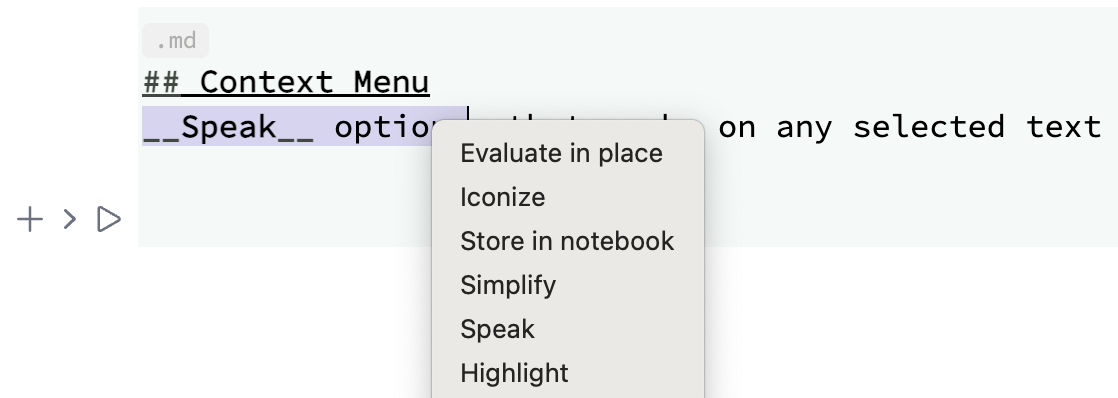
Speak options, that works on any selected text and calls Speak[]
Frontend
A new frontend feature, which is similar to FrontEditorSelected, but also works on any selected text in WLJS notebook
FrontTextSelected[] // FrontFetch