Release notes *2.7.8*
Performance Optimizations
The WLJS Interpreter is a silent hero running in the browser, handling all interactivity, UI updates, the core of
ManipulatePlot, and much more. It is essentially a tiny Wolfram Language interpreter.
We optimized a subsystem responsible for dynamics to handle better such cases:
ov = 1.0;
{Circle[], Line[{{0,0}, {Sin[ov], Cos[ov]} // Offload}]} // Graphics
(*VB[*)(Graphics[{Circle[{0, 0}], Line[{{0, 0}, Offload[{Sin[ov], Cos[ov]}]}]}, ImageSize -> Small])(*,*)(*"1:eJxTTMoPSmNkYGAoZgESHvk5KWlMIB4HkHAvSizIyEwuhoiA5H0yi0sgqtmAhHNmUXJOKqpsJpBmABMIU30y89BU4dfDDiT809Jy8hNTsFnNDCSCM/OKQVL5ZQgx5/ximBhcV1BpTmoxJ5DhmZuYnhqcWZVazArSnpuYkwMAQg4unA=="*)(*]VB*) Before, each update of ov could cause 2x reevaluation of the Line primitive, which is a waste of resources. Now, our systems have become smarter and disregard the duplicates:
ov = RandomReal[{0,2Pi}]; Symbols compression
We added gzip compression to any dynamic symbols exeeding 2048 bytes, which reduces the filesize of a notebook as well as saving and loading time. If you open now a notebook in the editor one can spot a Base63 encoded compressed data:
It is similar to what we did to big graphs or sound data.
Better support of 2D graphics
Even more supported primitives, modifiers!
RadialAxisPlot[{{9, 7, 9, 5, 5, 7}, {6, 2, 3, 8, 8, 7}, {6, 8, 3, 4,
   1, 9}}]
(*VB[*)(FrontEndRef["f343e8f9-f77e-43c1-b33b-2fcabc95147a"])(*,*)(*"1:eJxTTMoPSmNkYGAoZgESHvk5KRCeEJBwK8rPK3HNS3GtSE0uLUlMykkNVgEKpxmbGKdapFnqppmbp+qaGCcb6iYZGyfpGqUlJyYlW5oampgnAgCK3RYJ"*)(*]VB*) SVGGroup
We intoroduce a new (with respect to Wolfram Language Library) element:
With[{p = ContourPlot[x y, {x,0,1}, {y,0,1}]//First},
  Graphics[{
    Pink, Disk[], {Opacity[0.5], Translate[SVGGroup[p], {0.05,0.05}]}
  }, PlotRange->{{0,1.05}, {0,1.05}}]
]
(*VB[*)(FrontEndRef["d34d9848-1b18-417a-96ab-95d8c2d25e07"])(*,*)(*"1:eJxTTMoPSmNkYGAoZgESHvk5KRCeEJBwK8rPK3HNS3GtSE0uLUlMykkNVgEKpxibpFhamFjoGiYZWuiaGJon6lqaJSbpWpqmWCQbpRiZphqYAwB8ZhVQ"*)(*]VB*) A standard library lacks tools for grouping primitives in order to apply the properties to the group container. Like transparency for example. The modified properties such as RGBColor, Directive will not affect the content of SVGGroup, which helps to isolate the styles.
Slides styles
We refined the srtandard styles used for heading, titles and other sections on .slide cell type.
.slide

<!-- .slide: class="slide-standard" -->

# Title

Some text
<dummy >
<!-- .slide: class="slide-standard" -->

# Title

Some text
</dummy>
There is a shorthand class for standard PPT-like slides with left-aligned text and 100% height:
.slide

<!-- .slide: class="slide-standard" -->
Or for scrollable slides
.slide

<!-- .slide: class="slide-standard-scroll" -->

## Title

<br/><br/><br/>
...large content goes
<br/><br/><br/>
...large content goes
<br/><br/><br/>
...large content goes
<br/><br/><br/>

<br/><br/><br/>
...large content goes

<br/><br/><br/>
...large content goes
<br/><br/><br/>
...large content goes
<br/><br/><br/>
...large content goes
<br/><br/><br/>
...large content goes
<br/><br/><br/>
...large content goes
<dummy >
<!-- .slide: class="slide-standard-scroll" -->
## Title
<br /><br /><br />
...large content goes
<br /><br /><br />
...large content goes
<br /><br /><br />
...large content goes
<br /><br /><br /><br /><br /><br />
...large content goes
<br /><br /><br />
...large content goes
<br /><br /><br />
...large content goes
<br /><br /><br />
...large content goes
<br /><br /><br />
...large content goes
<br /><br /><br />
...large content goes</dummy> Async functions
We made a huge step in development of Async and Promise modules. AsyncFunction expression allows to write asynchronous sequential code avoiding callback hell. AsyncFunction and Await expressions and their concepts are built on top of promises:
temperature = "";
TextView[temperature // Offload]
If[Kernels[] == {}, LaunchKernels[1]];

Button["Get Temperature", AsyncFunction[Null, Module[{response},
  temperature = "Loading";
  response = ParallelSubmitAsync[URLRead[(*VB[*)(Uncompress["1:eJwlx7EOgjAUBdD+igsbbVpkMSH8A64mptarkNC+5nHr9zN4tnN5yXJ/GGNWsh4352LdrFSUPoMQmyS7n3cfUaR4cN4jN7Y3pjHYMXS7lO//frBX36WmisKJyBUa2RTPkE+6nCL0"])(*,*)(*"1:eJxTTMoPSmNmYGAo5gUSYZmp5S6pyflFiSX5RcEcQBHP5Py8zKrUlMwKICeNCaSQBUgEleakBrMCGT6JSak5wSAhv/y8VADrohJz"*)(*]VB*)]] // Await;
  temperature = ImportByteArray[response["BodyByteArray"], "RawJSON"]["current", "temperature_2m"];
]][]]
(*VB[*)(FrontEndRef["8adfafe8-3a4d-4c85-8990-de57aa132fcc"])(*,*)(*"1:eJxTTMoPSmNkYGAoZgESHvk5KRCeEJBwK8rPK3HNS3GtSE0uLUlMykkNVgEKWySmpCWmpVroGieapOiaJFuY6lpYWhropqSamicmGhobpSUnAwCWuBZt"*)(*]VB*) (*VB[*)(EventObject[<|"Id" -> "77baa753-1e5f-4593-94e0-2589f8c8d457", "Initial" -> False, "View" -> "b967121d-e458-414e-921a-12930b2dc60c"|>])(*,*)(*"1:eJxTTMoPSmNkYGAoZgESHvk5KRCeEJBwK8rPK3HNS3GtSE0uLUlMykkNVgEKJ1mamRsaGaboppqYWuiaGJqk6loaGSbqGhpZGhskGaUkmxkkAwB19hUH"*)(*]VB*) Heavy branching
In this example we demonstrate branching, assignments and compound expressions in asynchronous functions:
p1%20%3D%20Promise%5B%5D%3B%0Ap2%20%3D%20Promise%5B%5D%3B%0Ap3%20%3D%20Promise%5B%5D%3B%0A%0Awin%20%3D%20CurrentWindow%5B%5D%3B%0A%0ASpeak%5B%22Let%27s%20see%20how%20it%20works%21%22%5D%3B%0APause%5B2.5%5D%3B%0A%0Af%20%3D%20AsyncFunction%5BNull%2C%20With%5B%7B%7D%2C%0A%20%20Speak%5B%22Press%20p1%22%2C%20%22Window%22-%3Ewin%5D%3B%0A%20%20p1%20%2F%2F%20Await%3B%0A%20%20Speak%5B%22Press%20p2A%20or%20p2B%22%2C%20%22Window%22-%3Ewin%5D%3B%0A%20%20Module%5B%7Bm%20%3D%20-100%7D%2C%0A%20%20%20%20m%20%3D%20Await%5Bp2%5D%3B%0A%20%20%20%20Speak%5B%22Pause%202%20seconds%22%2C%20%22Window%22-%3Ewin%5D%3B%0A%20%20%20%20PauseAsync%5B2%5D%20%2F%2F%20Await%3B%0A%20%20%20%20%0A%20%20%20%20If%5Bm%20%3E%204%2C%0A%20%20%20%20%20%20Speak%5B%22Press%20p3%22%2C%20%22Window%22-%3Ewin%5D%3B%0A%20%20%20%20%20%20m%20%3D%20Await%5Bp3%5D%3B%0A%20%20%20%20%5D%3B%0A%0A%20%20%20%20StringTemplate%5B%22Result%3A%20%60%60%22%5D%5Bm%5D%0A%20%20%5D%0A%5D%5D%3B%0A%0AThen%5Bf%5B%5D%2C%20Speak%5D%3B To simulate async events here we use buttons
Button["p1", EventFire[p1, Resolve, True]]
Button["p2A", EventFire[p2, Resolve, 1]]
Button["p2B", EventFire[p2, Resolve, 5]]
Button["p3", EventFire[p3, Resolve, 10]]
Writting this in a traditional way would lead straight to the callback hell.
Limitations
The following constructions are supported with Await:
SetCompoundExpressionIfModule,With_Symbolor any other singular expressions
What is not supported (by now)
- Loops:
While,For,Do - Tables and maps:
Map,Table
Please read the documentation for more examples.
Animation Framework 🌈
AF is a build-in library for creating complex event-driven 2D animations in a functional style. You create all necessary primitives by yourself combining well-known expressions of Wolfram Language.
The framework is entirely based on AsyncFunction and Offload acting as a wrapper. You may also use GUI helper tools such as a timeline if you want:
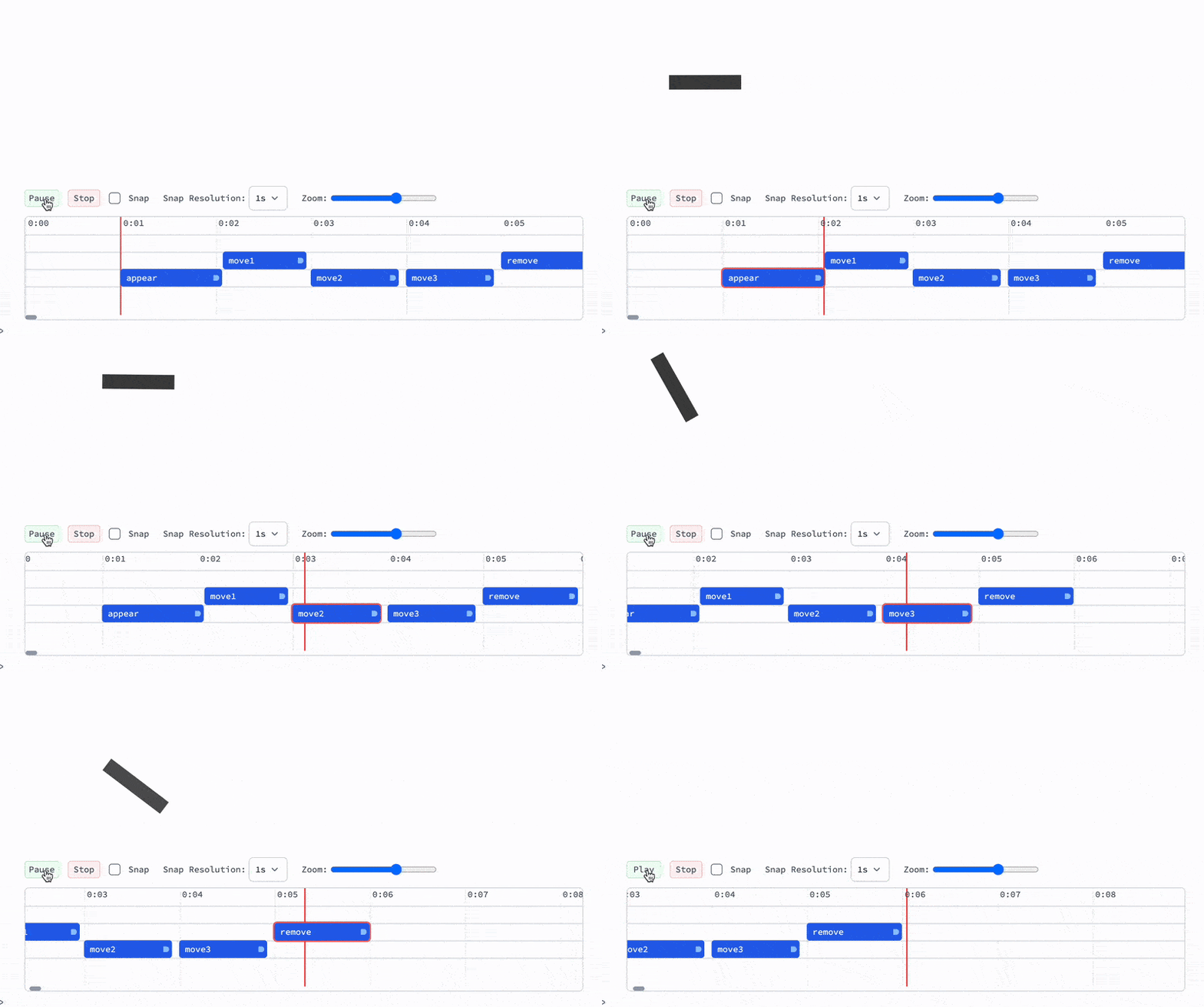
Or record a voice over right in-place.
See tutorials in the documentation on our website in Advanced section
Basic example
Here is how you can make an animation quickly using WL primitives as building blocks
Needs%5B%22AnimationFramework%60%22%20-%3E%20%22af%60%22%5D%20%2F%2F%20Quiet Create a scene:
s%20%3D%20af%60Scene%5B%5D%3B%0AFramed%5Bs%5D Run animation
AsyncFunction%5Bscene%2C%20Module%5B%7Bd%7D%2C%0A%20%20d%20%3D%20af%60AddTo%5Bscene%2C%20Disk%5B%23pos%2C%200.1%5D%2C%20%7B%0A%20%20%20%20%22pos%22%20-%3E%20%7B-1%2C0%7D%0A%20%20%7D%5D%3B%0A%0A%20%20af%60Animate%5Bscene%2C%20d%2C%20%22pos%22-%3E%7B1%2C0%7D%2C%20%22QuadOut%22%2C%201.5%5D%20%2F%2F%20Await%3B%0A%20%20%0A%20%20af%60Remove%5Bd%5D%3B%0A%5D%5D%5Bs%5D%3B And that's all you need. Here is another example with two objects:
AsyncFunction%5Bscene%2C%20Module%5B%7Bd%2Cr%7D%2C%0A%20%20r%20%3D%20af%60AddTo%5Bscene%2C%20%7BRed%2C%20Translate%5BRotate%5B%0A%20%20%20%20%20%20Rectangle%5B0.2%7B-1%2C-1%7D%2C%200.2%7B1%2C1%7D%5D%0A%20%20%2C%20%23angle%5D%2C%20%23pos%5D%7D%2C%20%7B%0A%20%20%20%20%22pos%22%20-%3E%20%7B1.5%2C1.5%7D%2C%0A%20%20%20%20%22angle%22%20-%3E%200.%0A%20%20%7D%5D%3B%20%20%0A%0A%20%20d%20%3D%20af%60AddTo%5Bscene%2C%20%7BBlue%2C%20Disk%5B%23pos%2C%200.1%5D%7D%2C%20%7B%0A%20%20%20%20%22pos%22%20-%3E%20%7B-1.5%2C0%7D%0A%20%20%7D%5D%3B%0A%0A%20%20%7B%0A%20%20%20%20af%60Animate%5Bscene%2C%20d%2C%20%22pos%22-%3E%7B0%2C0%7D%2C%20%22QuadOut%22%2C%201.5%5D%2C%0A%20%20%20%20af%60Animate%5Bscene%2C%20r%2C%20%7B%0A%20%20%20%20%20%20%22pos%22-%3E%7B0%2C0%7D%2C%20%22angle%22-%3E2Pi%0A%20%20%20%20%7D%2C%20%22QuadOut%22%2C%201.5%5D%0A%20%20%7D%2F%2F%20Await%3B%0A%20%20%0A%20%20af%60Remove%5Bd%5D%3B%0A%20%20af%60Remove%5Br%5D%3B%0A%5D%5D%5Bs%5D%3B To make more complex animations we also provide:
- easing functions;
- workers;
- loops;
and many more.