Release notes *2.6.4*
Improved support for SummaryBox and special symbols
Now ResourceFunction has its representation, and many other from the function repository can render correctly
metric = ResourceFunction["MetricTensor"]; metric%20%3D%20ResourceFunction%5B%28%2AVB%5B%2A%29%20ResourceObject%5B%3C%7C%22Name%22%20-%3E%20%22MetricTensor%22%2C%20%22ShortName%22%20-%3E%20%22MetricTensor%22%2C%20%22UUID%22%20-%3E%20%22c6c98873-a3bc-43e4-a1a4-ed6e5dbbaa32%22%2C%20%22ResourceType%22%20-%3E%20%22Function%22%2C%20%22Version%22%20-%3E%20%221.0.0%22%2C%20%22Description%22%20-%3E%20%22Represent%20a%20metric%20tensor%20%28field%29%20for%20a%20Riemannian%20or%20pseudo-Riemannian%20manifold%22%2C%20%22RepositoryLocation%22%20-%3E%20URL%5B%22https%3A%2F%2Fwww.wolframcloud.com%2Fobj%2Fresourcesystem%2Fapi%2F1.0%22%5D%2C%20%22SymbolName%22%20-%3E%20%22FunctionRepository%60%24e8bf75f345d9428d8514b42f99452556%60MetricTensor%22%2C%20%22FunctionLocation%22%20-%3E%20CloudObject%5B%22https%3A%2F%2Fwww.wolframcloud.com%2Fobj%2F841aede1-5fed-4606-91bd-ebe5f6619e11%22%5D%7C%3E%2C%20ResourceSystemBase%20-%3E%20Automatic%5D%20%28%2A%2C%2A%29%28%2A%221%3AeJxNj09rwzAMxbN2659dBr0MeloP%2FQI59taxlBWyFpIs57qxPAy2BbLD1m8%2FOS60lx96T9KztTpjpcZZlvkl4x3%2Fdkj2tCUS7gdk3Vsr6MK2eogzL4wdoQuFk62m0AuTGo%2BMTzRyKA7o4GaX2gc1iur17oVr8j6AbTX81pO4Jyxs3tLsM6OQOiDFdkqbMo5KGRQyGXPGd1V%2BQIcS6gWrdZ5%2FQSDdNeA8EssUFz9S9QbqWSxAyKMzl8FtqAf%2FFO8SxsM%2FDdFEIQ%3D%3D%22%2A%29%28%2A%5DVB%2A%29%5D%5B%7B%22Schwarzschild%22%2C%201%7D%2C%20%7Bt%2C%20r%2C%20a1%2C%20a2%7D%5D %28%2AVB%5B%2A%29BoxForm%60temporalStorage%24271064%28%2A%2C%2A%29%28%2A%221%3AeJxdkstum0AARa20lap%2BRZtFldiRADPgpDtwAGMMgwEDJsqCxxgDE8AMmMfXN%2B6ym6N7r%2B7y%2FIoq6%2FRlNpuRH5%2BQkqytGjdDvf37bjbTUdtksYNKUjVvD3NXfJs%2F%2FnyYP80fH%2Bb3zB%2B0HdsDw%2Bz6STiUAQUytN6BLVwjewSN7sOWZ5PkNUsawyjpRbAUjbqoIY4pEFJLbZ%2FAnBJ0v%2BfYzbUzo7g0FpjT1GhAF8YbAaBNqRoCy6mOmnYE8sfzcX8plbbOmPNhPHl4a5%2FSY7hdl1qgyHWnMzQLSWUT2R0YCCeoxoW%2FFlV150TtwKmWtXG7LrLMXf6xvXQnxyaeGjMWgaFzjCR3D43cp70wWIw08By9p1gM92ZugNcoYCLX0oF5IXzLOrQm62uv1PBBmlbusWj1emk4vbGYOCkttqlTgf6F2AdbCgF9Vcqzp3TTSs6FTKT7LcwCKR7Pq4WhuHhfa7LqNv7SxfUkeUA%2BWoSLLDplhWnUVVJ88Jndx%2FmQKEJcwL0CI%2F5sp0v%2BOavEvgUmV12JmSNeROq57J9Hb10lLJNWQ9xeAwrvTENgSt4XdMoc3XbpV2iiumh4iVlMJrXUuLg2eUYszQMnpocx2KT%2BDundcjJepKIbVsmqyCuSCSzYFMWmr9hUGbOOw%2Fc3B95dcf74frq76fP1E1aHkf39FlCYwBKP%2F1an6dB%2Fn5trNsIobsMII%2FLts8ohJugvJZfNvg%3D%3D%22%2A%29%28%2A%5DVB%2A%29 Improved support for primitives Graphics3D
Tubes, Spheres inside GraphicsComplex
GraphicsComplex expression is an efficient way of rendering many objects with shared coordinates, vertices, normals and colors. For a long time it was only possible for Polygon to work with such structures. Now we added the support for Tube, Sphere, Line
decomposition = ResourceFunction["DiscreteHypersurfaceDecomposition"][
  metric, {t, 0, 1}, {r, 0, 4}, {a1, -Pi, Pi}, 200, 1.5];
decomposition["CoordinatizedPolarGraphColored"] // GraphPlot3D
(*VB[*)(FrontEndRef["d935435c-c070-49da-b160-7822545d2d50"])(*,*)(*"1:eJxTTMoPSmNkYGAoZgESHvk5KRCeEJBwK8rPK3HNS3GtSE0uLUlMykkNVgEKp1gam5oYmybrJhuYG+iaWKYk6iYZmhnomlsYGZmamKYYpZgaAAB4dhTc"*)(*]VB*) Tube supports variable radius and dynamics!
The original implementation of Tube geometry from the standard library of THREE.js was quite limited. We reimplemented Tube from scratch in Javascript manually generating each vertex, normal and then passing it to a dynamic buffer of GPU.
Now it works much faster and does support dynamic updates of both: coordinates and radius. We don't waste the resources of GPU and heavily reuse the created buffers
Tube[{{0,1,0}, {0,0,0}, {0,-1,0}}, {0.2,0.3,0.1}] // Graphics3D (*VB[*)(Graphics3D[Tube[{{0, 1, 0}, {0, 0, 0}, {0, -1, 0}}, {0.2, 0.3, 0.1}]])(*,*)(*"1:eJxTTMoPSmNkYGAoZgESHvk5KRAeF5BwL0osyMhMLjZ2SWOCqQgpTUpNY4bxfDKLS1B5mUCaIRNkBJiFTZIBn+R/IMAiWTRrJgictC8yBoPL9lCRnfYA05Irhw=="*)(*]VB*) Here is a beautiful example of using tubes to draw scalar fields (taken from stackoverflow)
(*VB[*)(FrontEndRef["730749d0-16d4-41b0-874c-cf9fa7d38b91"])(*,*)(*"1:eJxTTMoPSmNkYGAoZgESHvk5KRCeEJBwK8rPK3HNS3GtSE0uLUlMykkNVgEKmxsbmJtYphjoGpqlmOiaGCYZ6FqYmyTrJqdZpiWapxhbJFkaAgB1ZBVM"*)(*]VB*) There are still some issues with calculating normals at the ends, but we will fix it later.
New export feature
Keep the filesystem within the notebook
It allows you to compress the whole notebook folder and embed it to a notebook. It uses simple gzip and stores the binary data as Base64 string
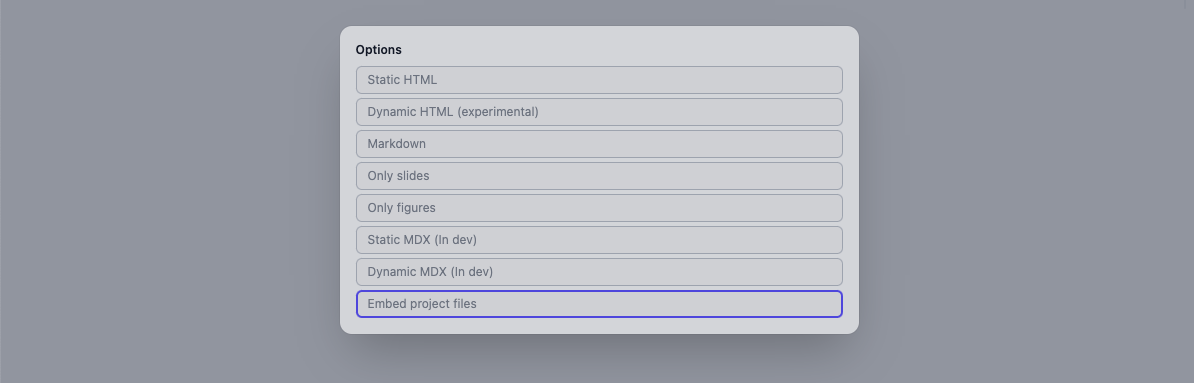
Then you only need to share your .wln file and on the first start it will self extract the files maintaining the original folder structure.
Experimental: Import WLN notebook
It might come handy, if you don't want to create a library, but still like to reuse some functions or templates from the other notebook.
We have registered the converter for that reason. What it does?
- Evaluate all initialization cells in the isolated context (can be any kind of cell)
- Evalaute the last input cell in the notebook and return the result (must be wolfram language cell)
Since it involves breaking the order of evaluation, that cell will will be evaluated 2 times. For example I have WLX templates defined in other notebook, that I would like to reuse here
MyBigHeader = NotebookEvaluateAsModule[
  FileNameJoin[{NotebookDirectory[], "attachments", "detect.wln"}]
];
MyBigHeader rm1159692765922806780G%60Header Now we can safely use it
.slide

<MyBigHeader>Title</MyBigHeader>
<dummy ><h2 style="
white-space: nowrap;
display: inline-block;
font-size: 400px;">Title</h2></dummy> You can see the unique context of the given symbol
MyBigHeader bespeak6311g%60Header Or something even cooller! Let it be a piano view
pianoView = NotebookEvaluateAsModule[
  FileNameJoin[{NotebookDirectory[], "attachments", "Piano.wln"}]
];
Try to play
pianoView[] (*VB[*)(FrontEndRef["6c4b3601-e742-44ed-b67e-db2ce6b04f2d"])(*,*)(*"1:eJxTTMoPSmNkYGAoZgESHvk5KRCeEJBwK8rPK3HNS3GtSE0uLUlMykkNVgEKmyWbJBmbGRjqppqbGOmamKSm6CaZmafqpiQZJaeaJRmYpBmlAACDGRX7"*)(*]VB*) TabView implemented!
We have added the support for TabView
TabView[{
  Sin->Plot3D[Sin[x] Sin[y], {x,-2Pi,2Pi}, {y,-2Pi,2Pi}],
  Sinh->Plot3D[Sinh[x] Sinh[y], {x,-2Pi,2Pi}, {y,-2Pi,2Pi}]
}]
(*VB[*)(Null)(*,*)(*"1:eJytUstu00AUDZQFYskfNGKRGEbyczJmF0euI6dNy9hJhKtKzLMxfozr2DT5Pz6McVGFxAZVYnM05+jeueeemXOqsHw1Go0ObzQsVcnl2cDeawjU8UK11beU0G0uHjWVr58rL/ND97tvqLxoVd2FNQ+PgvUdoaVIPmhZQk4l8zggtkmAy2wT+Nx1gT2zTRdSQbnp/PMSyNAMeh4D3LZ84LouBb7nmoA7CFHoIWsG/b98PbF3GkKed6odzCc/NZ0Y2+DWmE6eJ2Ehb8dU+2KMCyAhtYDLTW0X2g6YIcmkL4k2C8d304nxSXcaY+uziI9peqVukmpdfI3mKrsPk+WPwlvhhQjj4HGF2puVs1wnTtQlodlfbsqrU1Gst/fhKvaKIjpt6gamD01TlJF4IE2QF3BBSITrtir7IiY8a/INqXCfzb8sso84+z4eZt9tA2P6Z1Xc64TeDgdB+HVdnp7UtO3FywKwLFtYemWAPNfRr2QyQIRwALWpKREiiNnovwUQHRVpsKqqfd3smpxE1z2Jg0MBT6Rq9m0b73UoBGe7BdZ6l83nAYJ4t3lZAPnwqX4BI4TKKw=="*)(*]VB*) And it will work offline, since the widget prerenders all states and just swap between them using HTML and JS.
It has WLXForm implemented, therefore it can work on slides too
TabWidget = TabView[{
  Sin->Plot3D[Sin[x] Sin[y], {x,-2Pi,2Pi}, {y,-2Pi,2Pi}],
  Sinh->Plot3D[Sinh[x] Sinh[y], {x,-2Pi,2Pi}, {y,-2Pi,2Pi}]
}];
.slide
## My Tab Widget
<TabWidget/> <dummy >
## My Tab Widget
FrontEndExecutable[e065d062-f0a0-4f67-8c4c-0abbce0ad31c]</dummy> ChoiceDialog and MessageDialog
We added the support for dialog-tools. For example to show the message
MessageDialog[Plot[x, {x,0,1}]] If you want to prompt user to click yes or no, use
ChoiceDialog[Plot[x, {x,0,1}]] Or choose from the options
ChoiceDialog["Click on a plot", {
  Plot[x^2, {x,0,1}] -> 1,
  Plot[x^3, {x,0,1}] -> 2
}]
2 There is also async version, which returns a Promise
Then[ChoiceDialogAsync["Click on a plot", {
  Plot[x^2, {x,0,1}] -> 1,
  Plot[x^3, {x,0,1}] -> 2
}], Function[result,
  Do[Beep[]; Pause[0.2], {result}]
]];