Release notes *2.6.3*
Autocomplete improvements
We extended the support of providing suggestions for symbols loaded from external packages at runtime. If you load something Kernel will rescan added contextes from $ContextPath and populate the suggestion panel.
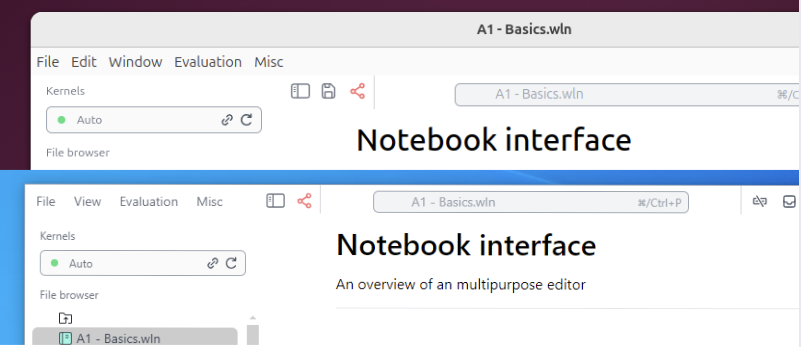
UI changes on Windows & Linux
We moved towards the simplity of the native apps and redesigned the main menu
New way of adding things on canvas
Wolfram Language is mostly immutable by the design, the same is true for all graphics primitives. To add new primitives on the canvas, you would need to reevalaute an expression again.
We can violate this rule, by injecting new expressions into existing one dynamically and evaluate them in-place. Since our frontend (browser) actually has OOP structure behind the curtains, we can refer to the particular instance of some object FrontInstanceReference
scene = FrontInstanceReference[];
Plot[x, {x,0,1}, Epilog->{scene}]
(*VB[*)(FrontEndRef["d537799a-7ff7-4567-a82f-795b86ad5817"])(*,*)(*"1:eJxTTMoPSmNkYGAoZgESHvk5KRCeEJBwK8rPK3HNS3GtSE0uLUlMykkNVgEKp5gam5tbWibqmqelmeuamJqZ6yZaGKXpmluaJlmYJaaYWhiaAwB+NhVA"*)(*]VB*) Then we can evaluate any expression in the context of our Plot like if it was there before
FrontSubmit[{RandomColor[], Disk[{.5,.5}, 0.1]}, scene]; To make a removable object, one need to wrap it into a special group, which allows to cancel the sideffects caused by evaluation
group = FrontInstanceGroup[];
FrontSubmit[{RandomColor[], Disk[{.7,.7}, 0.1]} // group, scene];
Then you can simply delete it
Delete[group]; Manipulate improvements
We trying to close a gap between Mathematica's Manipulate and WLJS version. We added the support of implicit selection form, i.e.
Manipulate[Plot3D[f[x] f[y], {x,-10,10}, {y,-10,10}], {f, {Sin, Tanh}}] Now this form is also valid (take a previous output), it localizes symbols only if one of them is occupied already
(*SpB[*)Power[x(*|*),(*|*)2](*]SpB*) - 2;
Manipulate[%, {x,-1,1}]